
July 1, 2026 - We are excited to announce the launch of our new online ordering portal! We hope clients find this new system easy to use and choose online ordering for many of their test requests. Learn more about online ordering below.
About the Portal
- The MSU VDL Online Ordering Portal can be used like many other familiar online ordering systems.
- Almost everything we offer can be ordered online with a few general exceptions: multiple animal (herd-based) submissions, most necropsies, and shipping solutions. If the test or service you need doesn’t have an “Add to Cart” button, please use a regular submittal form instead of the online ordering system.
Setting Up Your Account
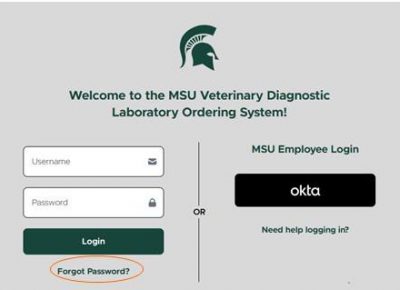
- Visit https://animalhealth.vdl.msu.edu/ or click the link to online ordering from our homepage at animalhealth.msu.edu.
- Click “Forgot Password”.
- Enter your MSU VDL account number and click “Next”.
- An email with a password re-set link will be sent to the email addresses associated with your MSU VDL account.
- Follow the steps in the email to create your password.
- You’re ready to log in!
- Enter your username and password and click “Login”.
Using the Portal
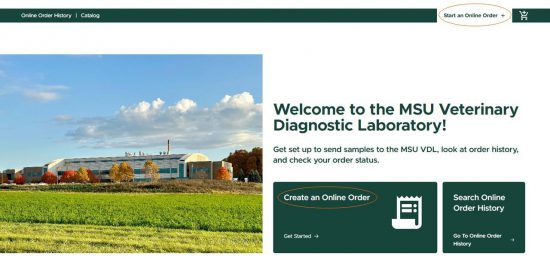
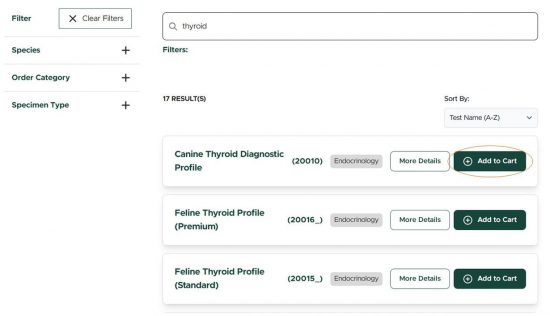
- Start an order by clicking one of the prompts to create a new order, or by searching the catalog and adding a test to your cart.
- Enter patient information and any additional information as prompted.
- After you submit the order, be sure to print your submission form to include with the samples.
Online Ordering Portal Frequently Asked Questions
Order Troubleshooting FAQs
Why can't I find the test I want to order?
You may need to clear search filters to see the test you are looking for. If that doesn't help, please call the Laboratory at 517-353-1683 and our client services team will be happy to assist you.
The test, service, or product I want to order doesn’t have an “Add to Cart” button. How do I order it?
Almost everything we offer can be ordered online with a few general exceptions: multiple animal (herd-based) submissions, most necropsies, and shipping solutions. If the test or service you need doesn’t have an “Add to Cart” button, please use a regular submittal form instead of the online ordering system.
My provider isn't listed. What do I enter?
Please use the text entry field to enter the provider's last name only, e.g. “Dr. Smith”. They will be added to the provider list for future orders.
I forgot to put the submission form in the box! What do I do?
Please contact the Laboratory at 517-353-1683 as soon as possible. If the samples are adequately labeled, we can match the submission with your submission form when the samples arrive.
What if I don't know the animal's date of birth?
Our online ordering portal requires a date of birth OR age. If your system has an age (or estimated age) for an animal, enter that and our system will calculate date of birth. If you enter a date of birth, it will calculate age. If the age is unknown or doesn’t apply to your submission (feed samples for example), select “Unknown.”
I don’t see mixed breed or my breed is not in the list. What do I do?
When you enter text into the breed field, it will search the entire entry, not just the beginning of the phrase or name. Common breeds you may need to find include: Dog Mixed Breed, Cat Mixed Breed, Horse Mixed Breed, Sheep Mixed Breed, Cattle Mixed Breed, Dog Other, Cat Other, Horse Other, Sheep Other, Cattle Other.
I'm at my cart and it won't let me submit. What am I doing wrong?
Please ensure that all required fields, including questions and prompts for additional information, are completed. If this doesn't resolve your issue, please complete a PDF submittal form and submit it with the sample as you would have previously and contact the Laboratory to report the issue at 517-353-1683.
I don't see my specimen listed. What specimen type should I select?
Specimens listed in the test catalog are the required or accepted specimens for the test selected. If the specimen collected is not listed, a new sample may be needed. Please contact the Laboratory at 517-353-1683 with further questions.
I'm getting an error when attempting to place an order. What do I do?
We're sorry that the online ordering portal isn't working for you. Please ensure that all required fields, including questions and additional information, are completed. If this doesn't resolve your issue, please complete a PDF submittal form and submit it with the sample as you would have previously and contact the Laboratory to report the issue at 517-353-1683.
Can I cancel the test I just ordered?
Please call the Laboratory at 517-353-1683 to cancel a test. Once an online order has been submitted, the order cannot be canceled online.
Can I add a test to samples I have already submitted?
Please call the Laboratory at 517-353-1683 to add a test.
Account FAQs
I'm having trouble with my login, can you help?
Try resetting your password for your account. If you are still having difficulty logging in, please contact the laboratory at 517-353-1683.
Can I update my clinic information in the online ordering portal (e-mail / address / name)?
To make changes or update your account information in the online ordering portal, please call the Laboratory at 517-353-1683.
Is my password the same for logging into my account to see my reports and for the ordering portal?
Our WebView system for viewing results is separate from our online ordering portal. Your username for both systems is your VDL account number. To follow internet security best practices, it is not recommended to use the same password in more than one system.
I don't want to see e-mails updating me regarding sample receipt or status. I just want my report. Is that possible?
Status emails are sent to all emails on file for report distribution. If you wish to change the email addresses associated with your account, please call the Laboratory at 517-353-1683.
Reports & Results FAQs
Can I view my reports online?
VDL clients can view their reports online via our WebView system as they have previously. In the future, we plan to have reports and ordering available in the same system, but they are currently in separate systems.
My order status shows complete, but I haven't received my results yet! When will I get my report?
Once testing is completed and results are released it can take up to two hours for the reports to be distributed by email and/or to be viewable online via WebView. If you need assistance, please contact our client services team at 517-353-1683 and they will be happy to assist you.
I have results, but my order status is in progress. What is pending?
Please contact our client services team at 517-353-1683 and they will be happy to provide additional details about the status of your submission.
Printing Submission Forms FAQs
My submission form won't print. Can you help?
Follow advice from your IT support and/or troubleshooting prompts provided on your device. If you cannot print from that computer/device, you can access the submission form from your submitted orders on another device connected to a printer to print the form before sending your sample(s).
I ordered the test on my cell phone. How do I print the submission form?
If you have a mobile-enabled printer, you should be able to print from your cell phone. If not, you can access the submission form from your submitted orders on another device connected to a printer to print the form before sending your sample(s).
The website is down, can I submit a sample using a paper submission form?
Yes! We still provide our previous submittal forms and clients can order online or using paper forms.
All my submission forms are two pages. Can this be fixed?
We're sorry about that. To save paper, we recommend 2-sided printing if that is supported by your printer.
Making Payments
VDL clients may choose to pay their statement balance online. Statements are generated monthly and your account is not charged until testing is completed. Our payment system is separate from our online ordering portal.